The parallel, worktree-per-agent feature in Claude Code and Codex is exactly how I want to interact with coding agents. For each task or ticket: fire off an agent and, while it churns or tests, pick up whatever other agent is blocked. It’s antithetical to deep work, but it’s an efficient way to get straightforward tasks done.
Claude Code and Codex are traps
Claude Code and Codex exist to keep developers paying Ferrari-like token prices when I really want a Honda. Right now I’m driving a DeepSeek v4.1 Flash — it’s fast, competent, and cheap. It’s like a Civic Type R.
Abandoning Claude Code or Codex meant trying out OpenCode and Pi (plus Modal Shared Endpoints — I’m a company man). OpenCode is batteries-included; Pi is minimal. Neither worked for me. Out of the box, their shortcomings include:
- too much session selection/juggling (even with shortcuts, this is tedious)
- too few worktrees (you add support through plugins)
- awkward interactions with an editor (flipping back and forth between the diff in the worktree and the agent chat is also tedious)
I believe that OpenCode or Pi could have worked on their own… if I’d spent an absurd amount of time customizing them for my particular flow. But I’ve been through that before with Neovim. What happens is: I spend an hour each day over two weeks adding and removing features until I wind up with a jankier and more-frequently-broken version of an IDE as I try to remember what my original productivity goals had been.
And, to be fair: I liked Pi. Maybe it’s the branding, but it does feel minimal (and slightly faster). I’ve also read some things implying the harness helps keep costs down:
Harness choice has little effect on task success rate, but can significantly affect the cost on the benchmarks we test. The same model can achieve similar success rates at up to 5x costs. — arena.ai
Agent Integrated Development Environments
Orca addresses all my issues with standalone Pi. It checks off every box I wanted plus a few I hadn’t considered.
Before describing those boxes, I’ll say: this didn’t need to be a new category. Existing IDEs could have supported ADEs’ features. VS Code is trying, but (at the time of writing) its agent harness selection is limited and — per usual — trying to funnel people to GitHub Copilot. At this point I’m just going to avoid Microsoft. I don’t think their PMs get it.
Table stakes
Orca has some features I would never give up — I’d expect these from any alternative IDE going forward:
- it supports harnesses like Pi that route to whatever provider I want
- it natively supports worktrees (per-task) with vertical tabs showing their agents’ status
- it has a tree view and code editor (Monaco, the same as VS Code) so I can inspect files and diffs alongside the rest of the repo
Aside: every L7+ person in my AWS management chain would sprinkle “table stakes” into their talks. I thought it was a restaurant reference as in “table steaks.” And I wondered why a fancy dinner was relevant to the latest security feature. Now I only associate “table stakes” with its SaaS connotation: the set of features necessary to compete. That business/MBA definition of the phrase bears little resemblance to the poker rule: “a player may bet no more money than they had on the table at the beginning of the hand.” I continue to think it’s some lame jargon.
Inline feedback
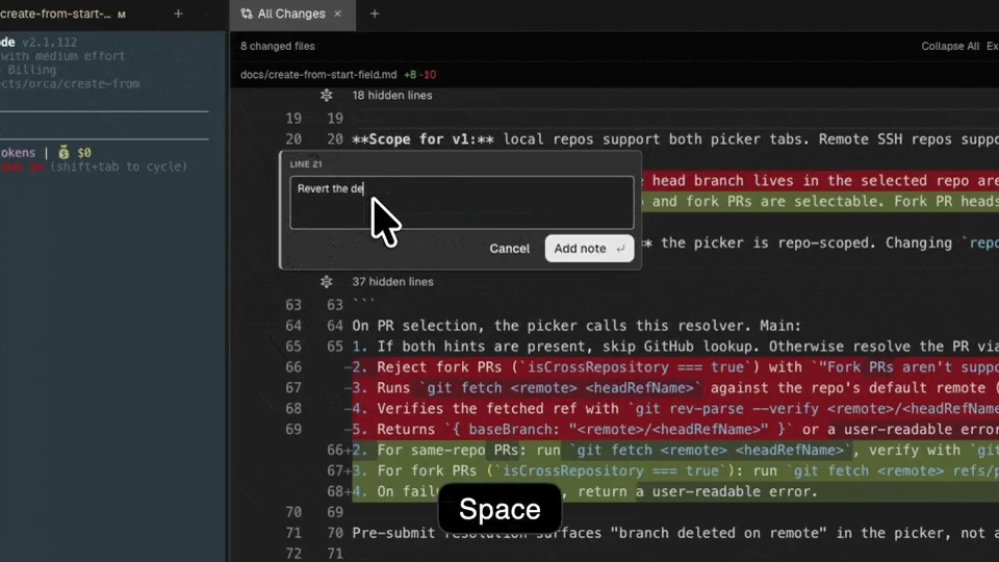
I’ll start with a killer feature I’ll never give up: the ability to review an agent’s changes locally and give feedback (as though it were a PR on GitHub). I can highlight lines and submit feedback on them directly to the agent. Just two weeks ago I was submitting draft PRs from OpenCode to GitHub then reviewing “my” PRs — tearing them apart as one does giving an LLM feedback — like I was arguing with myself.
Remote servers
Like VS Code’s SSH-based Remote Development feature, Orca can accept a hostname (reachable via SSH or Tailscale), install an Orca server onto it, and connect. This is beautiful for devboxes for two reasons. One: the agent will continue working when I disconnect (w/o having to manage tmux sessions). And two: my laptop’s resources are reserved for whatever I’m doing (rather than Bazel build/test tasks).
Built-in browser
I’m not a front-end dev, but I wind up doing some. This blog, for one, but also some Admin UI sorta tooling (for cloud platforms). And Orca has another nice feature I wouldn’t have thought to look for: an integrated browser. What’s particularly nice about this is that I can highlight elements, click on them, and send the coding agent feedback about exactly that section of the page.
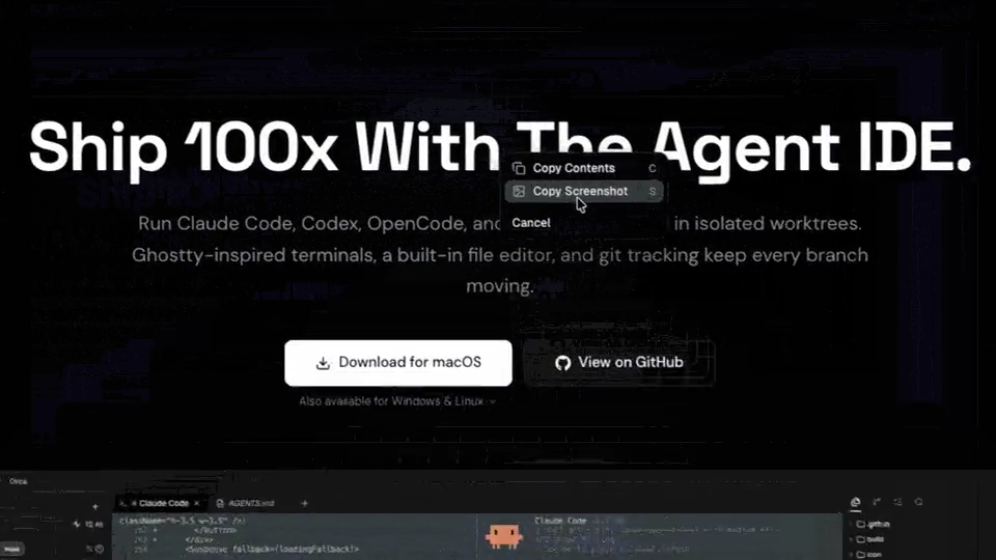
This addresses the same issue as the “Inline feedback” feature above: giving feedback to the agent is frictionless and specific. I’m not typing “the grayed-out button that says submit” into the agent chat — I’m clicking directly on the button and typing “wtf is up with the font fix this shit jfc this is the 3rd time.”